

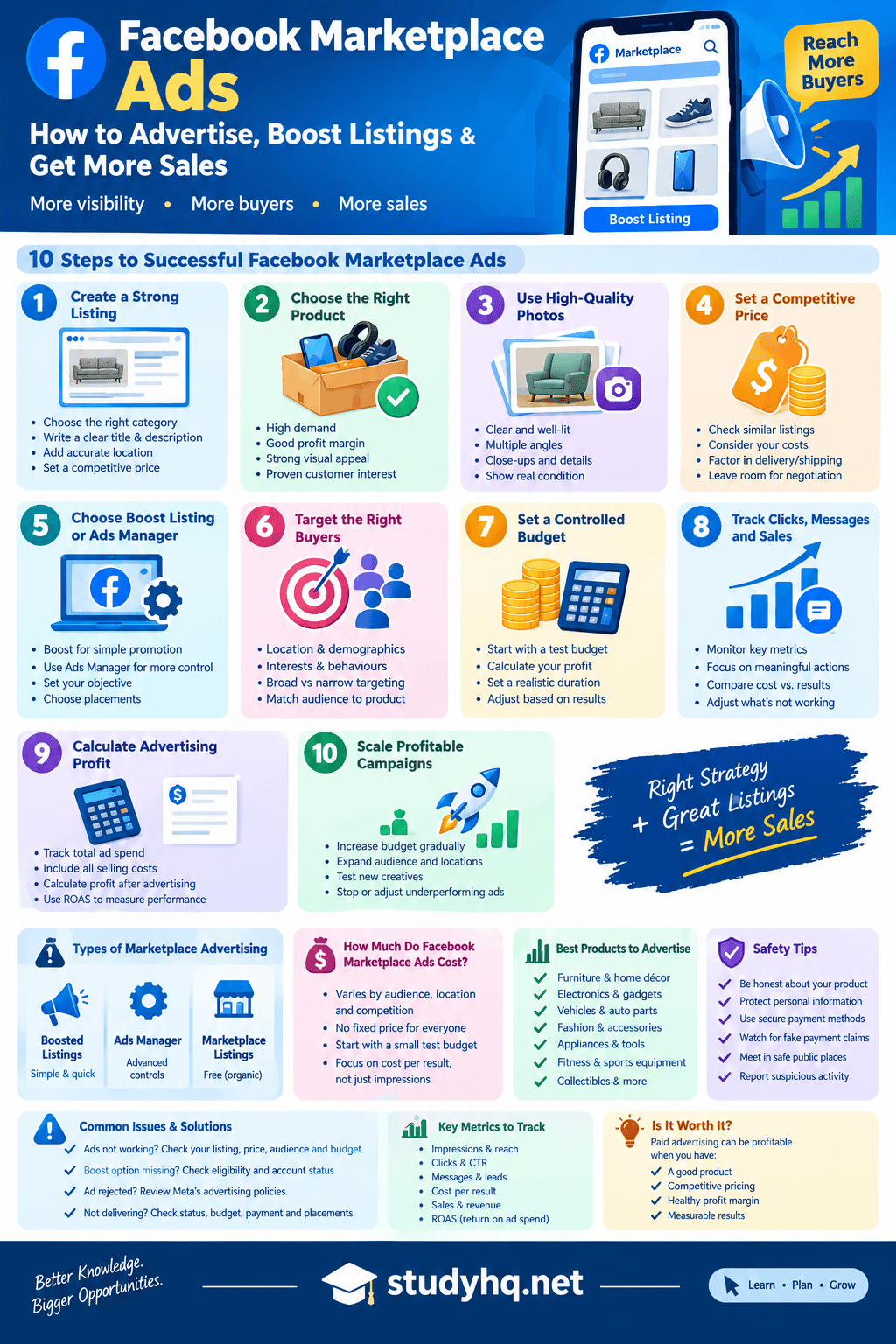
StudyHQ.net will teach you how Facebook Marketplace ads work, how to boost listings, set a budget, target buyers, measure results and increase profitable sales during the course of this article. Thus, if you are here because you are in dire need of how to use Facebook Marketplace Ads as a beginner, this article has gotten you covered. Continue reading below.
Interestingly, Facebook Marketplace can put a product in front of people who are already looking to buy, but getting attention organically is not always enough. When a listing receives few views, messages or offers, paid promotion can be one way to increase its exposure.
But simply spending money on an advertisement does not guarantee a sale. Your product, price, photos, listing quality, audience, budget and follow-up with buyers all influence the result.
In this guide, you will learn how Facebook Marketplace ads work, how to advertise a Marketplace product, how to boost a listing, how Marketplace promotion differs from broader Meta advertising, how much advertising can cost, how to choose a budget, how to target potential buyers and how to measure whether your campaign is actually profitable.
You will also learn what to do when Facebook Marketplace ads are not working, a boost option is missing, an advertisement is rejected or an ad is not delivering as expected.
The exact options available can vary by account, country, product and Meta’s current advertising interface, so treat the steps below as a practical framework rather than a promise that every account will show identical buttons.
What Are Facebook Marketplace Ads?
Facebook Marketplace ads are paid promotional activity designed to increase exposure for products or offers being sold through Facebook’s Marketplace environment or through eligible Meta advertising setups.
Marketplace itself is a place where people can buy and sell products on Facebook. Meta says people can sell through Marketplace, buy and sell groups or a Facebook Page, and shipping availability can depend on where they live.
The important distinction is between listing a product and paying to promote that product.
Creating a Marketplace listing does not automatically mean you are running a paid advertising campaign. A seller can create a listing, add photographs, set a price and wait for organic interest.
Paid promotion is different because money is being spent to increase exposure or achieve an advertising objective.
This makes Facebook Marketplace advertising particularly relevant to sellers who already have a product that they believe has demand but want to reach more potential buyers.
How Facebook Marketplace Ads Work
At a basic level, the process looks like this:
- Choose a product to sell.
- Create a strong Marketplace listing.
- Make sure the product information is accurate.
- Determine whether paid promotion is available for the listing or campaign.
- Choose the appropriate advertising objective and audience.
- Set a budget and duration.
- Submit the promotion or campaign.
- Monitor the results.
- Compare advertising costs with actual sales and profit.
- Improve or stop the campaign based on the results.
The most important point is that advertising is only one part of the selling process.
If your product is overpriced, your photographs are poor or your description leaves important questions unanswered, increasing the number of people who see the listing may simply increase the number of people who ignore it.
Facebook Marketplace Ads vs Organic Marketplace Selling
Organic Marketplace selling means you publish a listing and rely primarily on Marketplace discovery and buyer interest without paying for additional advertising.
Paid promotion introduces advertising expenditure.
| Factor | Organic Marketplace Selling | Paid Promotion |
|---|---|---|
| Advertising spend | None | Required for paid promotion |
| Exposure | Primarily organic | Paid exposure |
| Testing speed | Depends on organic demand | Can provide controlled testing |
| Budget | Not applicable | Seller chooses within available options |
| Risk | Lower financial advertising risk | Advertising spend can be lost |
| Measurement | Marketplace activity | Advertising and sales metrics |
| Best use | Testing basic demand | Increasing exposure or testing a proven offer |
Neither approach eliminates the need for a good listing.
A seller may get many views but few buyers if the price is too high. Another seller may receive many messages but few completed transactions because the product description is unclear or the buying process is inconvenient.
What Is the Difference Between Facebook Marketplace Ads and Facebook Ads?
This is an important distinction because people sometimes use the terms interchangeably.
Facebook Marketplace is a buying and selling environment within Facebook. Meta’s broader advertising system allows advertisers to create campaigns with different objectives, audiences, creatives and placements.
Depending on the campaign and available options, Marketplace may be relevant as part of the wider Meta advertising ecosystem.
That does not mean every Marketplace listing automatically becomes a full Ads Manager campaign.
It is better to think of the two concepts this way:
Marketplace listing: Your product is available for buyers to discover.
Marketplace promotion: You pay to increase exposure where the relevant promotion feature is available.
Meta advertising campaign: You use Meta’s advertising tools to create and manage an advertising campaign with campaign-level controls.
The exact relationship between these options can change as Meta updates its products.
Are Facebook Marketplace Ads Free?
Creating a normal Marketplace listing and paying for advertising are two different things.
A seller may be able to list an item without paying an advertising fee, while paid promotion requires an advertising budget when the feature is available.
The cost of paid advertising is not one universal amount that applies to every seller.
Your available options can depend on factors such as:
- Country
- Account
- Campaign setup
- Audience
- Objective
- Duration
- Competition
- Available advertising features
- Product and listing eligibility
This is why sellers should be cautious about articles that promise one fixed Facebook Marketplace advertising price for everyone.
Does Paying for Facebook Marketplace Ads Guarantee Sales?
No.
Advertising can increase exposure, but exposure is not the same thing as demand.
Imagine you are selling a used dining table for $900 in a market where comparable tables are selling for considerably less.
You could increase the number of people who see the listing, but the underlying pricing problem remains.
A better advertising process starts with the product itself.
Ask:
- Is there demand for this product?
- Is my price competitive?
- Are the photographs convincing?
- Is the product description complete?
- Is the location suitable?
- Can buyers understand how they will receive the product?
- Is the profit margin large enough to support advertising?
If the answers are weak, improve the offer before increasing the advertising budget.
How to Create a Facebook Marketplace Listing Before Advertising
A paid campaign cannot compensate for a poor listing indefinitely.
Before spending money, make the underlying Marketplace listing as strong as possible.
Choose the Correct Category
Select the most appropriate product category available.
An accurate category helps establish context for the listing and can make it easier for interested buyers to understand what you are selling.
Write a Clear Product Title
Your title should tell the buyer exactly what the product is.
Instead of:
Great Item for Sale
Use something descriptive such as:
Solid Oak Dining Table, Seats 6, Excellent Condition
The second title gives the buyer useful information immediately.
Use High-Quality Product Photos
Your first photograph is particularly important because it may determine whether someone stops scrolling to examine the listing.
Use:
- Good lighting
- Clear backgrounds
- Multiple angles
- Close-up photographs
- Photos of important features
- Honest photographs of defects
- Appropriate photographs of size or dimensions
Avoid photographs that make the product look dramatically different from reality.
Write a Complete Description
Answer the questions a serious buyer is likely to ask.
Depending on the product, include:
- Brand
- Model
- Size
- Colour
- Condition
- Age
- Features
- Included accessories
- Known defects
- Location
- Pickup information
- Delivery information where available
- Relevant warranty information
Set a Competitive Price
Pricing can have a major influence on buyer response.
Research comparable listings before deciding on your price.
Consider:
- Condition
- Brand
- Age
- Features
- Local demand
- Availability
- Delivery or pickup
- Comparable prices
Do not assume that a higher price automatically means higher profit. If the price prevents the product from selling, advertising expenditure may simply increase the cost of an unsuccessful listing.
How to Advertise on Facebook Marketplace
If your account and listing have access to an available promotion feature, the general process is straightforward.
Step 1: Create the Marketplace Listing
Start with the product itself.
Complete the relevant fields and make sure the listing is accurate.
Step 2: Review the Listing
Before paying for promotion, check:
- Title
- Price
- Photos
- Description
- Category
- Location
- Condition
- Availability
Step 3: Look for the Available Promotion Option
Depending on your account and current Facebook interface, you may see an option related to promoting or boosting the listing.
The wording and availability can change.
Step 4: Choose the Advertising Objective
Your available options may vary.
The appropriate objective depends on what you are trying to achieve.
For example, a seller may care about:
- Product exposure
- Buyer messages
- Website visits
- Leads
- Sales
Do not choose an objective simply because it sounds attractive. Choose the one that matches your actual business goal.
Step 5: Choose the Audience
Consider:
- Location
- Relevant demographics
- Product demand
- Local versus wider markets
- Buyer characteristics
Step 6: Set the Budget
Start with an amount you can afford to test without putting your entire profit margin at risk.
Step 7: Choose the Duration
A short controlled test can help you understand whether the offer is generating useful interest before committing more money.
Step 8: Review the Campaign
Check the final details before submitting.
Step 9: Monitor Results
Do not judge the campaign solely by impressions.
Look at the actions that matter to your business.
Step 10: Compare Advertising Cost With Actual Results
The final question is not simply:
How many people saw my ad?
It is:
Did the advertising produce enough valuable buyer activity or sales to justify what I spent?
How to Boost a Facebook Marketplace Listing
One of the most searched questions around Marketplace promotion is how to boost a listing.
A boost is essentially a simpler form of promotion available in certain circumstances.
If the feature is available to you, the process generally involves selecting the listing, choosing the available promotional settings, setting a budget and submitting the promotion.
However, Facebook’s interface and eligibility rules can change.
Before You Boost a Listing
Check these five things first:
- The product is actually worth promoting.
- The listing photographs are strong.
- The price is competitive.
- The description answers buyer questions.
- Your profit margin can support advertising.
Boosting a weak listing does not make the listing strong.
Facebook Marketplace Ads vs Boosted Listings
Boosting a listing is generally simpler than building a more advanced campaign through Meta’s advertising tools.
| Feature | Boosted Listing | Ads Manager |
|---|---|---|
| Setup | Simpler | More detailed |
| Learning curve | Lower | Higher |
| Targeting controls | May be more limited | More campaign controls |
| Reporting | Simpler | More detailed |
| Testing | Basic | More flexible |
| Suitable for | Individual sellers and quick tests | Businesses and experienced advertisers |
| Scaling | Depends on available features | More campaign options |
A beginner who simply wants to promote an existing listing may prefer the simpler route if it is available.
A business managing multiple products or campaigns may need the additional controls offered through Ads Manager.
What Is Facebook Marketplace Ads Manager?
Meta Ads Manager is the broader advertising management environment used to create, manage and monitor Meta advertising campaigns.
A typical campaign structure can involve:
Campaign → Ad Set → Ad
The campaign defines the broader objective.
The ad set can control elements such as audience, budget, schedule and placements depending on the campaign.
The ad contains the creative and messaging that the audience sees.
This structure gives advertisers more control than simply promoting an individual listing.
How to Run Paid Ads on Facebook Marketplace With Ads Manager
The exact interface may change, but the strategic process remains similar.
Define Your Objective
Decide what you want to achieve.
For example:
- More qualified traffic
- More leads
- More messages
- More purchases
- Increased awareness
Define Your Audience
Think about who actually needs the product.
If you are advertising a high-end road bicycle, your audience is unlikely to be identical to the audience for children’s furniture.
Your product should determine your audience.
Set Your Budget
Decide how much you are prepared to spend while testing.
Choose Available Placements
Review the placements offered for your campaign.
Do not assume that every advertising campaign will have exactly the same placement options.
Create the Ad
Your creative should make the product immediately understandable.
Include:
- Strong visual
- Clear offer
- Important product details
- Useful headline
- Appropriate call to action
Review and Publish
Meta says ads are reviewed against its Advertising Standards before they run. The review can consider elements such as the creative, targeting, destination and other components. Meta also says most ads are reviewed within 24 hours, although some can take longer.
That means sellers should not necessarily interpret a temporary review status as an immediate rejection.
How Much Do Facebook Marketplace Ads Cost?
The question “How much do Facebook Marketplace ads cost?” does not have one universal answer.
Advertising costs can vary according to the campaign and market.
Factors that can affect performance and spending include:
- Audience
- Competition
- Objective
- Location
- Duration
- Budget
- Product
- Ad quality
- Demand
- Conversion performance
Rather than looking for one fixed price, think about advertising as a controlled financial experiment.
Example of a Small Test Budget
Suppose a seller decides to test a product using:
$5 per day for 3 days
Total planned advertising spend:
$15
This is an illustrative planning example, not an official Meta price.
Example of a Larger Test
Another seller might test:
$20 per day for 5 days
Planned advertising spend:
$100
Again, this is simply an example of how a seller might structure a test.
The important principle is to determine what you can afford to lose while learning.
How to Set a Facebook Marketplace Ads Budget
Start with your profit calculation.
Suppose:
- Selling price = $250
- Product cost = $140
- Other selling expenses = $20
Your profit before advertising is:
$250 – $140 – $20 = $90
If you spend $30 on advertising and make one sale, your remaining profit becomes:
$90 – $30 = $60
This is much more useful than saying:
“I generated $250 in sales.”
The seller did not earn $250 in profit.
Calculate Your Break-Even Advertising Cost
The maximum amount you can spend on advertising before a sale becomes unprofitable depends on your profit before advertising and any other costs.
A simple formula is:
Break-even advertising cost = Selling price – Product cost – Other selling costs
If your pre-advertising profit is $90, spending more than $90 on advertising for that single sale would push that transaction into a loss.
That does not mean $90 is necessarily a sensible target.
A profitable business usually needs a safety margin.
Should You Start With a Small Budget?
For a new product or untested campaign, a controlled budget can reduce unnecessary risk.
A test should answer questions such as:
- Are people interested?
- Are people clicking?
- Are people sending messages?
- Are qualified buyers asking questions?
- Are people actually purchasing?
- Is the cost of acquiring a customer sustainable?
If the answer is no, increasing the budget may not solve the underlying problem.
How to Target Buyers With Facebook Marketplace Ads
Targeting should begin with the product.
Ask:
Who is most likely to buy this?
Then consider:
- Location
- Age range where relevant
- Product-related interests where available
- Buyer intent
- Local demand
- Household characteristics where relevant
- Product price
Local Products Need Local Thinking
Furniture, large appliances and other bulky products may be more suitable for geographically focused advertising because the buyer may need to collect the item or arrange delivery.
A seller in London may want to reach buyers within an appropriate radius instead of paying to reach people hundreds of miles away.
Likewise, a furniture seller in Los Angeles may need to think differently from an online retailer that ships products nationwide.
Do Not Make Your Audience Too Narrow
Extremely narrow targeting can reduce the number of people who can see the campaign.
At the same time, targeting people who have no realistic reason to purchase can waste advertising spend.
The goal is relevance.
Best Products to Promote With Facebook Marketplace Ads
Not every product is equally suitable for paid promotion.
Products that can be easier to demonstrate visually may benefit from strong photography and advertising creative.
Examples include:
- Furniture
- Electronics
- Vehicles
- Appliances
- Fitness equipment
- Fashion
- Collectibles
- Home décor
- Tools
- Musical equipment
However, the most important consideration is not the product category alone.
Consider:
Demand + Margin + Price + Competition + Buyer Intent
A product with strong demand and healthy margins can give advertising more room to work.
How to Create Facebook Marketplace Ads That Get Attention
A successful advertisement starts with the creative.
Use a Strong Main Image
The image should make the product easy to understand.
Avoid unnecessary clutter.
Show the Product From Multiple Angles
A buyer may want to see:
- Front
- Back
- Side
- Close-up
- Packaging
- Accessories
- Condition
Make the Offer Clear
The buyer should quickly understand:
- What is being sold
- How much it costs
- Where it is located
- What condition it is in
- What makes it useful
Avoid Misleading Creative
Do not use photographs that make the product look dramatically better than it actually is.
Trust matters in Marketplace transactions.
How to Get More Views on Facebook Marketplace
More views can begin with better listing fundamentals.
Improve the Main Photograph
A clear, attractive photograph can make the listing easier to understand.
Improve the Title
Use descriptive product information.
Review Your Price
Compare similar listings.
Complete the Listing
Do not leave important information unanswered when the platform provides appropriate fields.
Improve the Description
Answer likely buyer questions before they need to ask.
Promote Strategically
Paid promotion can be considered after the listing is already strong.
How to Get More Buyers on Facebook Marketplace
Views are only the first step.
To increase the likelihood of attracting serious buyers:
- Use accurate pricing
- Be transparent about condition
- Respond promptly
- Answer questions clearly
- Provide useful photographs
- State pickup or delivery arrangements
- Avoid unnecessary pressure
- Make the buying process simple
A buyer who clicks the listing but cannot determine where the item is located may leave.
A buyer who sends a message and waits too long for a response may also move on.
How to Get More Sales on Facebook Marketplace
The path from impression to sale can be thought of as a funnel:
Exposure → Listing view → Buyer interest → Message → Conversation → Offer → Transaction
If sales are weak, identify where the process is breaking down.
Many Views but Few Messages
Potential problems:
- Weak product
- Poor price
- Weak photographs
- Unclear description
- Wrong audience
Many Messages but Few Sales
Potential problems:
- Price objections
- Poor follow-up
- Delivery difficulties
- Product condition concerns
- Lack of buyer confidence
Few Views
Potential problems:
- Weak exposure
- Poor listing
- Low demand
- Inappropriate category
- Limited availability of promotional options
This approach is more useful than simply increasing the budget.
Facebook Marketplace Ads Metrics You Should Track
Do not measure advertising performance using views alone.
| Metric | What It Tells You |
|---|---|
| Impressions | How often the ad was shown |
| Reach | Number of people reached |
| Clicks | Initial interest |
| CTR | Percentage of impressions that produced clicks |
| Messages | Buyer enquiries |
| Cost per message | Advertising cost for generating enquiries |
| Leads | Potential customers |
| Purchases | Completed sales |
| Cost per purchase | Cost of acquiring a customer |
| Revenue | Sales generated |
| ROAS | Revenue relative to advertising spend |
What Is ROAS?
ROAS means Return on Ad Spend.
The basic formula is:
ROAS = Revenue ÷ Advertising Spend
Suppose you spend $50 and generate $250 in attributable revenue.
Your ROAS is:
$250 ÷ $50 = 5
That means you generated $5 in revenue for every $1 spent on advertising.
But ROAS is not the same as profit.
If your product costs $180 and you generated $250 in revenue after spending $50 on advertising, your simplified remaining amount would be:
$250 – $180 – $50 = $20
This is why sellers should examine profit, not revenue alone.
How to Test Facebook Marketplace Ads
Testing is easier when you change one major variable at a time.
For example, you could test:
Test A: Existing product photograph
Test B: Improved product photograph
Then compare the results.
Later, you might test:
Price A: $220
Price B: $200
Or:
Creative A: Product-focused image
Creative B: Lifestyle-oriented image
Changing everything simultaneously makes it difficult to understand what caused the result.
Meta’s advertising ecosystem also supports testing approaches, although the exact testing options depend on the campaign and product. The broader principle is simple: isolate meaningful variables and compare results rather than changing everything at once.
Facebook Marketplace Ads Strategy for Beginners
If you are new to paid Marketplace promotion, keep your first campaign simple.
Step 1: Choose One Product
Do not begin by promoting ten unrelated products.
Step 2: Improve the Listing
Fix the photographs, title, price and description.
Step 3: Establish Your Profit Margin
Know how much money remains after product and selling costs.
Step 4: Set a Controlled Test Budget
Choose an amount you can afford.
Step 5: Identify the Buyer
Think about location and product relevance.
Step 6: Launch the Campaign
Use the promotion or advertising option available to your account.
Step 7: Monitor Meaningful Actions
Look at messages, clicks, leads and purchases.
Step 8: Diagnose the Problem
Do not immediately blame the advertising platform.
Step 9: Improve the Weakest Part
Change the photograph, offer, price, audience or copy where appropriate.
Step 10: Scale Carefully
Only increase spending when the economics make sense.
Why Are My Facebook Marketplace Ads Not Working?
There are several possible reasons.
Your Product May Have Weak Demand
Advertising cannot create unlimited demand for a product that very few people want.
Your Price May Be Too High
Compare your price with similar products.
Your Photos May Be Weak
If buyers cannot understand the product from the photographs, they may ignore the listing.
Your Audience May Be Wrong
A good advertisement shown to the wrong people can still perform poorly.
Your Listing May Be Incomplete
Missing information can create friction.
You May Be Measuring the Wrong Result
If your goal is sales, impressions alone are not enough.
Why Can’t I Boost My Facebook Marketplace Listing?
If the boost option is missing, do not automatically assume the feature has disappeared permanently.
Possible explanations include:
- Feature availability
- Listing eligibility
- Account limitations
- Product restrictions
- Marketplace restrictions
- Payment issues
- Interface changes
- Regional differences
Check the listing and account status first.
If the option remains unavailable, review the current Meta Help Center information relevant to your account.
Facebook Marketplace Boost Listing Not Showing
If you expected to see a boost or promotion option but cannot find it:
- Confirm the listing is active.
- Check whether the listing contains restricted content.
- Review your account status.
- Check payment information if applicable.
- Try the current Facebook interface on another supported device.
- Review Meta’s current Marketplace and advertising guidance.
- Contact Meta support if the issue persists.
Avoid relying on old screenshots because Facebook’s interface can change.
Why Was My Facebook Marketplace Ad Rejected?
Meta reviews advertisements against its Advertising Standards.
Its review process can consider the ad’s:
- Images
- Video
- Text
- Targeting
- Destination
- Special Ad Category status
- Advertiser permissions
- Other relevant information
Meta says an advertisement can be rejected after review if it does not comply with the applicable standards.
If you believe an advertisement was incorrectly rejected, Meta provides a review process for eligible cases.
Common Areas to Check
Review:
- Product claims
- Photographs
- Description
- Landing destination where applicable
- Targeting
- Restricted products
- Misleading information
- Advertising policy requirements
Do not repeatedly submit substantially identical ads without first understanding the problem.
Facebook Marketplace Ads Not Delivering
If your campaign has been approved but is not delivering as expected, check:
- Campaign status
- Ad set status
- Ad status
- Budget
- Schedule
- Payment status
- Audience
- Available placements
- Account restrictions
- Recent edits
Also remember that changing some elements of an advertisement can trigger another review. Meta says changes to targeting, creative, optimisation or billing events can initiate a new review process.
Facebook Marketplace Paid Ads Mistakes That Waste Money
1. Promoting a Poor Listing
Fix the listing before spending heavily.
2. Ignoring Competitor Prices
Buyers can compare similar products quickly.
3. Spending Too Much Before Testing
Start with a controlled experiment.
4. Targeting Everyone
A large audience is not automatically a relevant audience.
5. Focusing Only on Views
Views do not pay the bills.
6. Ignoring Messages
A buyer enquiry can become a sale if handled properly.
7. Advertising Extremely Low-Margin Products
Advertising costs can consume the available profit.
8. Changing Too Many Variables
You may never discover what actually improved or damaged performance.
9. Ignoring Product Rules
Make sure your product and advertising approach comply with applicable Marketplace and Meta policies.
10. Continuing to Advertise a Sold Product
Stop or update advertising when inventory changes.
How to Scale Facebook Marketplace Ads
Scaling should happen after you understand your economics.
Start by identifying products that have:
- Genuine demand
- Competitive pricing
- Healthy margins
- Good buyer response
- Acceptable advertising costs
Then consider gradually increasing exposure.
Scale the Budget Carefully
A sudden increase in spending can change campaign performance.
Expand the Audience Carefully
If a product works in one location, examine whether similar buyers exist elsewhere.
Test New Creative
Do not rely forever on one photograph or advertisement.
Monitor Profit
The campaign should still make financial sense after scaling.
Facebook Marketplace Ads for Small Businesses
Small businesses can use Marketplace as one part of a broader customer-acquisition strategy.
Potentially suitable products include:
- Furniture
- Electronics
- Home products
- Fashion
- Tools
- Fitness equipment
- Vehicles
- Collectibles
The important question is not simply whether a product can be listed.
Ask:
Can this product be sold profitably after advertising and other selling costs?
A small business should also keep records of:
- Advertising spend
- Product costs
- Revenue
- Leads
- Sales
- Refunds or returns where applicable
- Other transaction expenses
This allows the owner to distinguish between activity and actual profitability.
Facebook Marketplace Ads for Local Businesses
Local businesses need to think carefully about geography.
For a bulky product, reaching someone several hours away may not be useful.
For a product that can be shipped easily, a wider audience may make more sense.
Examples include:
Furniture seller: Local geographic focus may be important.
Used vehicle seller: Location, buyer qualification and product value can matter significantly.
Fashion seller: Wider geographic reach may be possible if shipping is practical.
The right audience depends on the product and fulfilment method.
Facebook Marketplace Ads for Online Businesses
An online business may use Marketplace-related exposure as part of a broader advertising strategy.
The seller should make the transition from advertisement to purchase as clear as possible.
Where a campaign directs people beyond Marketplace, make sure the destination is accurate, functional and consistent with the advertisement.
Remember that Meta’s ad review process can include the destination of an advertisement, not only the creative itself.
Is Paying for Facebook Marketplace Ads Worth It?
The answer depends on the numbers.
Instead of asking whether paid promotion is universally worth it, ask these questions:
- Does the product have demand?
- Is the price competitive?
- Is the profit margin sufficient?
- Can advertising generate qualified interest?
- Can you measure sales?
- Can you afford to test?
- Is your cost per acquisition sustainable?
- Does additional advertising produce incremental sales?
For example, suppose a product produces $80 in profit before advertising.
If advertising costs $10 to generate a sale, the campaign may leave $70 before other relevant expenses.
If advertising costs $75 to generate that same sale, there may be very little economic benefit.
This is why profitability should guide decisions rather than impressions alone.
Facebook Marketplace Ads Safety Tips
Advertising and selling should also be approached with buyer and seller safety in mind.
Meta’s Marketplace safety guidance covers topics including scams, seller verification, ratings, meeting in person and reporting concerns.
Be Accurate About the Product
Do not hide important defects.
Be Careful With Payment Claims
Do not rely solely on screenshots or messages claiming that payment has been made.
Verify payments independently through the relevant financial account.
Protect Personal Information
Do not unnecessarily publish sensitive information in a public listing.
Be Careful With In-Person Meetings
For local transactions, consider meeting in an appropriate public location and letting someone you trust know about the meeting.
Meta’s own educational resources also advise users to protect personal information and take precautions when completing marketplace transactions in person.
Watch for Suspicious Behaviour
Be cautious when someone:
- Creates unusual urgency
- Wants to overpay
- Requests unusual payment arrangements
- Sends suspicious links
- Claims payment has been made without independent confirmation
- Wants to move the transaction away from normal Marketplace processes immediately
Facebook Marketplace Ads Checklist
Before Advertising
-
Choose a product with genuine demand
-
Check comparable prices
-
Calculate your profit margin
-
Create a clear listing
-
Use strong photographs
-
Write an accurate description
-
Select the correct category
-
Confirm product eligibility
-
Decide on your advertising objective
-
Set a controlled budget
During Advertising
-
Monitor impressions
-
Monitor reach
-
Monitor clicks
-
Monitor messages
-
Track leads
-
Track sales
-
Monitor advertising spend
-
Watch for rejected or limited ads
-
Respond to serious buyer enquiries
-
Avoid unnecessary campaign changes
After Advertising
-
Calculate total advertising cost
-
Calculate revenue
-
Calculate profit
-
Calculate cost per acquisition
-
Review which creative performed better
-
Review audience performance
-
Stop campaigns that are clearly uneconomical
-
Improve successful campaigns
-
Scale gradually
Frequently Asked Questions About Facebook Marketplace Ads
What are Facebook Marketplace ads?
Facebook Marketplace ads are paid promotional activities designed to increase exposure for products or offers associated with Marketplace or eligible Meta advertising campaigns.
How much do Facebook Marketplace ads cost?
There is no single price that applies to every advertiser. Cost can vary according to campaign setup, audience, market, objective, duration and other factors.
Is Facebook Marketplace advertising free?
A normal Marketplace listing and paid advertising are different. A seller may be able to create a listing without paying for advertising, while paid promotion requires advertising spend when the feature is available.
How do I advertise on Facebook Marketplace?
Start by creating a strong Marketplace listing. If a promotion feature is available, review the available objective, audience, budget and duration, then submit the promotion and monitor the results.
How do I boost a listing on Facebook Marketplace?
If your account and listing are eligible for a boost feature, select the relevant Marketplace listing and follow the available promotion options. The exact interface can change.
How much does it cost to boost a Facebook Marketplace listing?
The cost is not one universal amount. Available budgets and pricing can depend on the account, campaign, market and current Meta interface.
Can I use Meta Ads Manager for Marketplace advertising?
Meta Ads Manager is the broader advertising environment for creating and managing Meta campaigns. Whether a particular Marketplace placement or setup is available depends on the campaign and account.
Why can’t I boost my Facebook Marketplace listing?
Possible reasons include feature availability, listing eligibility, product restrictions, account limitations, payment issues or changes to the Marketplace interface.
Why are my Facebook Marketplace ads not working?
Check the product, price, listing quality, audience, creative, budget, campaign status and buyer response. Low performance does not necessarily mean the advertising platform is the only problem.
Why was my Facebook Marketplace ad rejected?
An ad may be rejected if it does not comply with applicable Meta Advertising Standards. Review the advertisement’s creative, text, targeting, destination and product eligibility.
How do I get more views on Facebook Marketplace?
Improve your photographs, title, description, category and pricing first. Paid promotion can then be considered where available.
How do I get more sales on Facebook Marketplace?
Focus on the entire buyer journey. Use accurate listings, competitive pricing, strong photographs, relevant targeting and fast, useful responses to serious buyers.
What is the best budget for Facebook Marketplace ads?
There is no single best budget. Start with an amount appropriate for your profit margin and use the initial campaign to gather useful information.
How long should I run a Marketplace advertising test?
The appropriate testing period depends on the campaign, budget, product and amount of buyer activity. Avoid making major conclusions from extremely limited data.
Should I advertise every Marketplace listing?
Not necessarily. Consider advertising products with sufficient demand, healthy margins and a reasonable chance of generating profitable sales.
What products work well with Marketplace advertising?
Products with clear demand, attractive margins and strong visual presentation can be suitable. Examples include furniture, electronics, vehicles, appliances, fashion and home products.
Can small businesses use Facebook Marketplace advertising?
Yes, where the relevant Marketplace and advertising features are available. Small businesses should pay particular attention to margins, local demand, customer acquisition costs and fulfilment.
What should I track when running Facebook Marketplace ads?
Track impressions, reach, clicks, messages, leads, purchases, advertising spend, cost per acquisition and revenue. Most importantly, calculate actual profit.
Conclusion
Facebook Marketplace ads can be useful when you treat advertising as part of a complete selling system rather than as a shortcut to guaranteed sales.
Start with the product.
Then improve the listing.
Use clear photographs, accurate information and competitive pricing. Decide who the likely buyer is and determine whether paid promotion makes financial sense.
If a promotion or boost option is available, start with a controlled budget. Monitor meaningful results rather than focusing only on impressions.
If the campaign generates views but no messages, investigate the listing, price, product and audience. If it generates messages but few purchases, examine the offer, buyer objections and sales process.
For businesses using more advanced Meta advertising tools, Ads Manager can provide additional campaign controls and reporting. However, more controls also mean that advertisers need to understand their objectives, audience, budget and performance metrics.
Most importantly, calculate profit.
A campaign that produces thousands of impressions but loses money is not a successful sales strategy simply because the numbers look large.
The strongest Facebook Marketplace advertising strategy is therefore built around a simple cycle:
Create a strong listing → Reach relevant buyers → Measure meaningful actions → Calculate profit → Improve the weak points → Scale carefully.
For additional resources, build your Facebook Marketplace content hub around related guides covering advertising costs, boosting listings, targeting, rejected ads, Marketplace selling tips, product selection and advertising ROI. Each supporting article can link back to this pillar so readers can move naturally from basic questions to more advanced Marketplace strategies.
And before launching any campaign, review the current Meta rules and available features for your account and market. Meta’s advertising review process and Marketplace features can change over time, so current platform guidance should take priority over older screenshots or instructions.


